














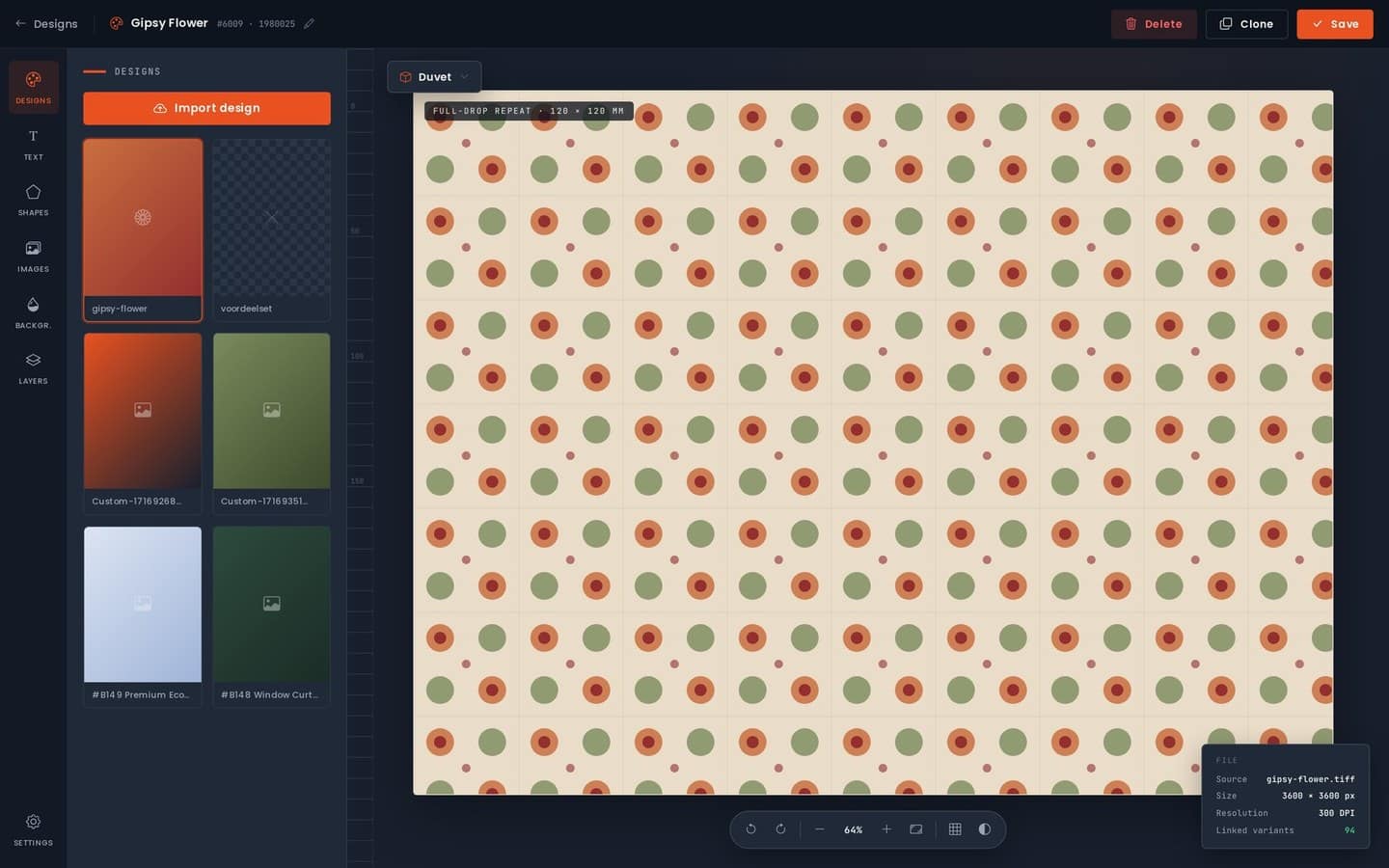
Fabrixa Studio is a white-label product customiser you embed directly in your storefront as an iframe. Your customers open it, design or personalise a product on the page, and the saved design is attached to their order — all under your own brand. There is no Fabrixa logo, no redirect to a third-party site, and no separate account for the shopper to create. It works with Shopify, WooCommerce and custom stores, and it plugs into the same platform that prints, packs and ships every order white-label as standard.
In short: your customers get a live design experience on your product pages, and you get a print-ready design tied cleanly to each order — without building a customiser from scratch. Here is how it works and what you can do with it.
What Fabrixa Studio is (and what it is not)
Fabrixa Studio is an embeddable customiser, not a code library. You drop it into your storefront as an iframe, so the visual editor lives on your page and inherits your brand. It is deliberately not an SDK — you are not wiring up UI components or maintaining a design tool yourself. The heavy lifting (the canvas, the render, the print-ready output) is handled by Fabrixa; you handle placement and the order.
The order handoff is simple. When a customer finishes a design, Studio saves it and you attach that design to the corresponding line item in the cart using its cart_item_key. From there the order flows through Fabrixa like any other: we print it, pack it, and dispatch it under your brand and return address. The end customer never sees that Fabrixa exists.
What you can do with it
- Let customers personalise products live — add names, numbers, text, colours or their own artwork on the product page, with an instant preview.
- Keep it fully white-label — the customiser sits inside your storefront and carries your branding; there is no Fabrixa branding anywhere the shopper can see.
- Attach the design to the order automatically — the saved design binds to the line item by
cart_item_key, so what the customer made is exactly what gets produced. - Run it on the store you already have — embed it in a Shopify or WooCommerce theme, or in a custom-built storefront.
- Print it on the fabric it’s meant for — designs go into reactive print on cotton and linen or sublimation on polyester, produced across Portugal, Spain and the Netherlands.
- Skip the minimums — with MOQ 1, a personalised one-off is a valid order; you don’t need volume to justify a custom product.
How it fits your storefront
Studio is one of four ways to connect to Fabrixa. You can bring orders in through a Shopify store, a WooCommerce store, the Integration API, or Fabrixa Studio — and Studio can sit alongside any of them. A common setup is a connected store for the catalogue and checkout, with Studio embedded on the product pages that offer personalisation.
The flow looks like this:
- A customer opens a product that offers personalisation and the embedded customiser loads inside your page.
- They design or personalise the item and Studio saves the result.
- You attach that saved design to the cart line item via its
cart_item_key. - The order reaches Fabrixa, and we print, pack and ship it white-label.
For apparel made in Portugal, a typical order runs to roughly 6–9 business days. Because dispatch is white-label as standard, the parcel arrives with your brand on it and your return address — the personalised product and the packaging both read as yours.
Why embed a customiser at all
Personalisation is one of the few product features that genuinely can’t be replicated by a competitor’s stock listing — a name, a date, a one-off design belongs to that customer. Offering it on the page, with a live preview, tends to lift both conversion and average order value, and it turns a plain catalogue item into something made-to-order.
The catch has always been the build: a real customiser is a non-trivial piece of software, and stitching one to a production pipeline is harder still. Fabrixa Studio removes both problems. You get the editor and the print-ready output from the platform, you keep full control of branding and placement, and the design lands on the order cleanly through the cart_item_key — no manual re-uploading of artwork, no mismatch between preview and production.
FAQ
Do my customers see Fabrixa branding anywhere?
No. Fabrixa Studio is white-label: the customiser is embedded in your storefront and carries your branding, and dispatch ships under your brand with your return address. End customers never see the Fabrixa name.
Which platforms does Fabrixa Studio work with?
Shopify, WooCommerce and custom-built stores. You embed the customiser as an iframe, and it can run alongside a connected store or the Integration API.
Is Fabrixa Studio an SDK?
No. It’s an embeddable, white-label customiser you place in your storefront as an iframe — not a code library you assemble yourself. You attach the finished design to the order by its cart_item_key.
How does the customer’s design reach production?
When the design is saved in Studio, you bind it to the cart line item via cart_item_key. The order then flows to Fabrixa, and we print, pack and dispatch it white-label — so the produced item matches the on-screen preview.
Get started
If you sell products that people want to make their own, an embedded Fabrixa Studio customiser is the quickest way to offer it without building the tool yourself. See how it sits within the wider Fabrixa platform, follow the integration guide to wire it into your storefront, and order a Sample Pack to check how reactive print resolves on your chosen cotton base — the cost is credited against your first order. If you’d like to map it to your own product range, talk to our team.
