





















01
Savienot
Connect your shop
Link your Shopify or WooCommerce store, or build straight onto the API. Orders import on their own.

Connect the shop you already run, design your products in Fabrixa Studio, or power your own POD platform through our API — and we print, pack and ship every order. From 1 piece to 100,000 — no minimums, no setup fees, no contracts.
A print partner usually means a PDF price list and an email address. Every order is a message, every change is a thread, every status update is a question you have to ask.
Fabrixa works differently. The platform is the product: connect once, and your orders, designs, production and shipping all run through a single dashboard. Reactive print is the engine — the platform is how you drive it.


Set it up once. After that, every order that lands in your shop flows through to production without you lifting a finger.
Link your Shopify or WooCommerce store, or build straight onto the API. Orders import on their own.
Open Fabrixa Studio, drop your artwork onto a real product template, and set it to print.
Publish to your channels with your own SKU and price. Sell one or ten thousand — the platform doesn’t mind.
Reactive-printed in the EU, packed in your box, shipped to your customer. You watch it happen.
Run a Shopify store? A WooCommerce site? Building your own? Connect it once and orders import automatically — no copy-paste, no exports, no missed orders.
Need to place something by hand — a sample, a one-off, a wholesale order? Create it straight from the dashboard. Every order, from every channel, lands in the same list.
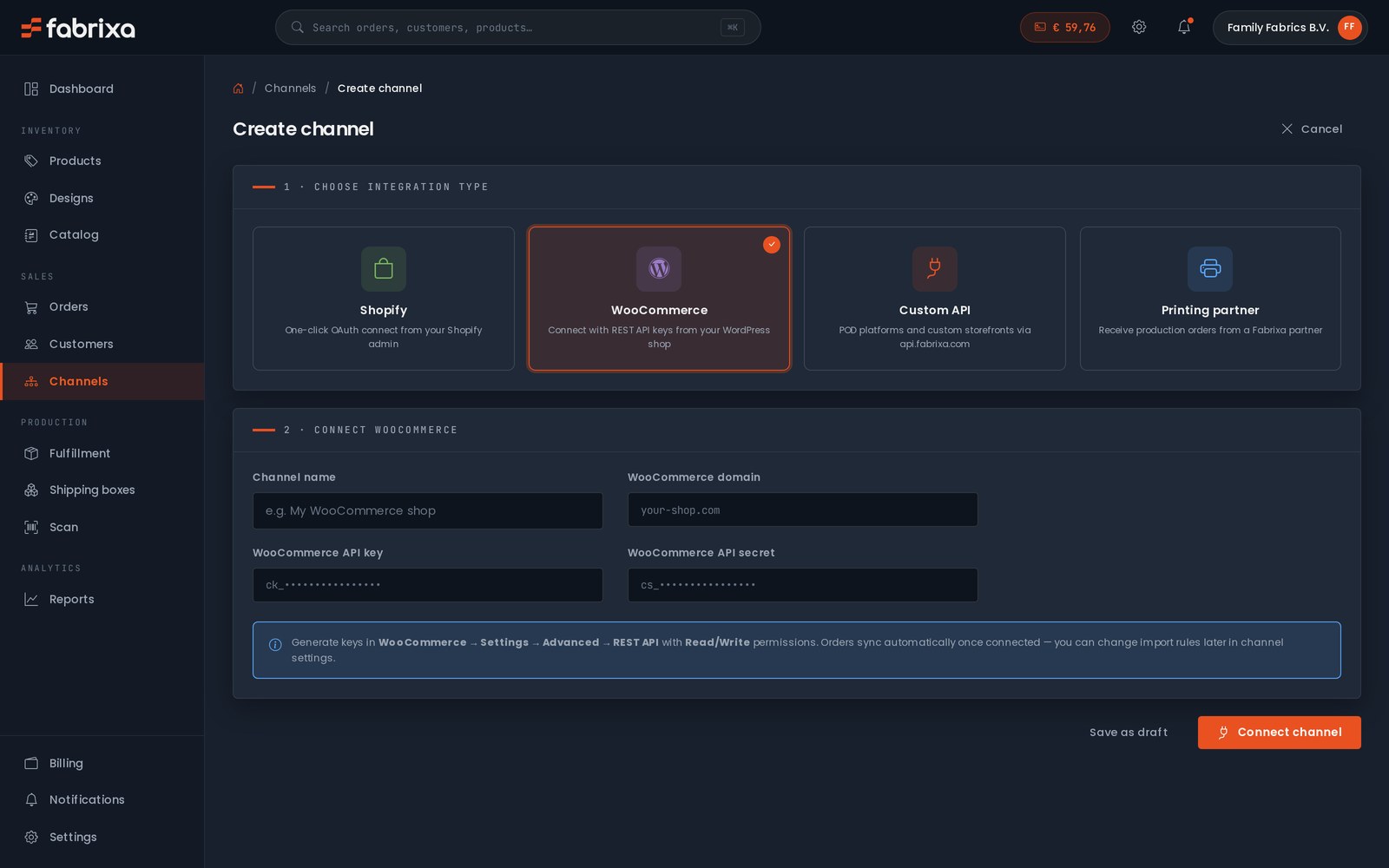
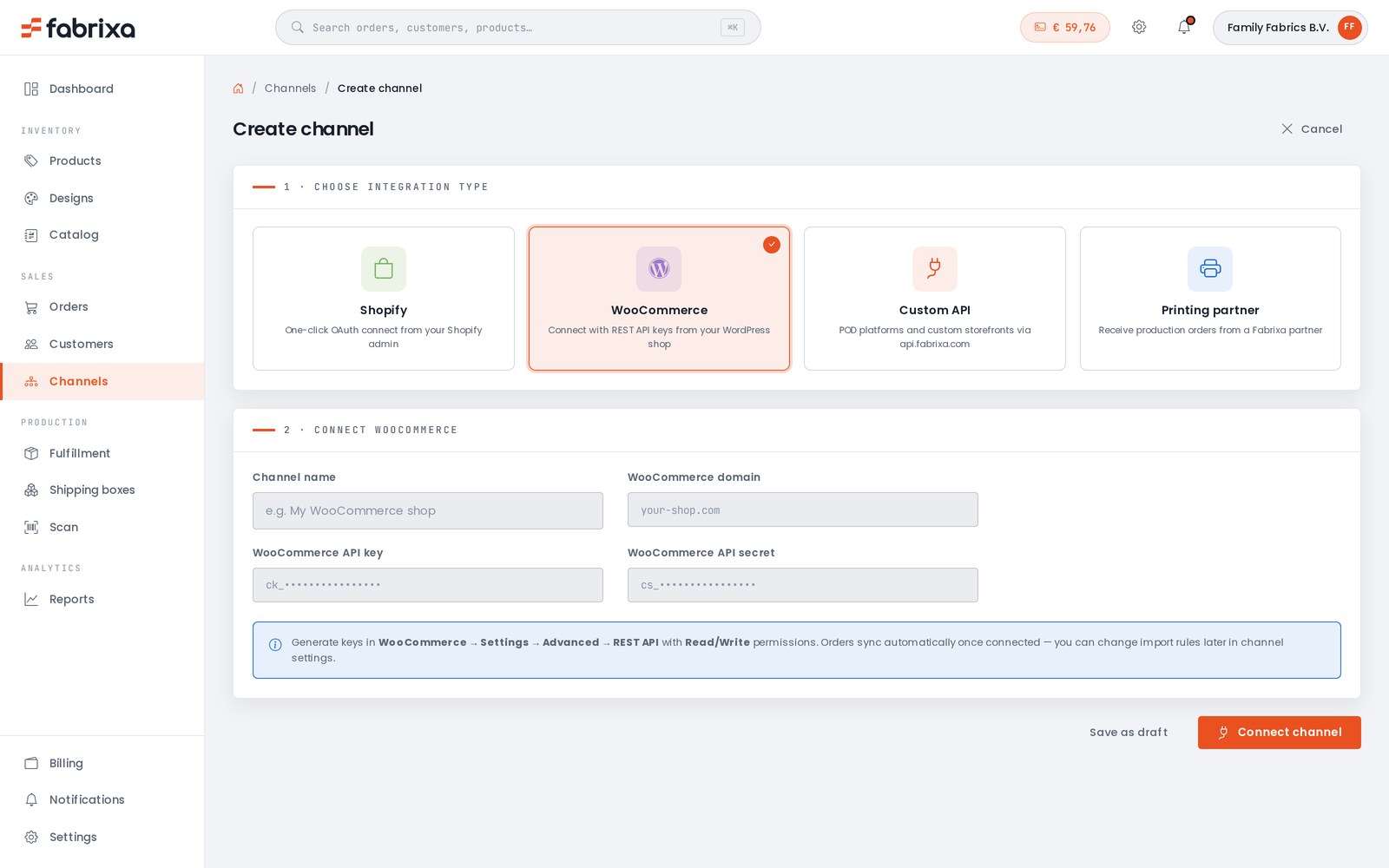
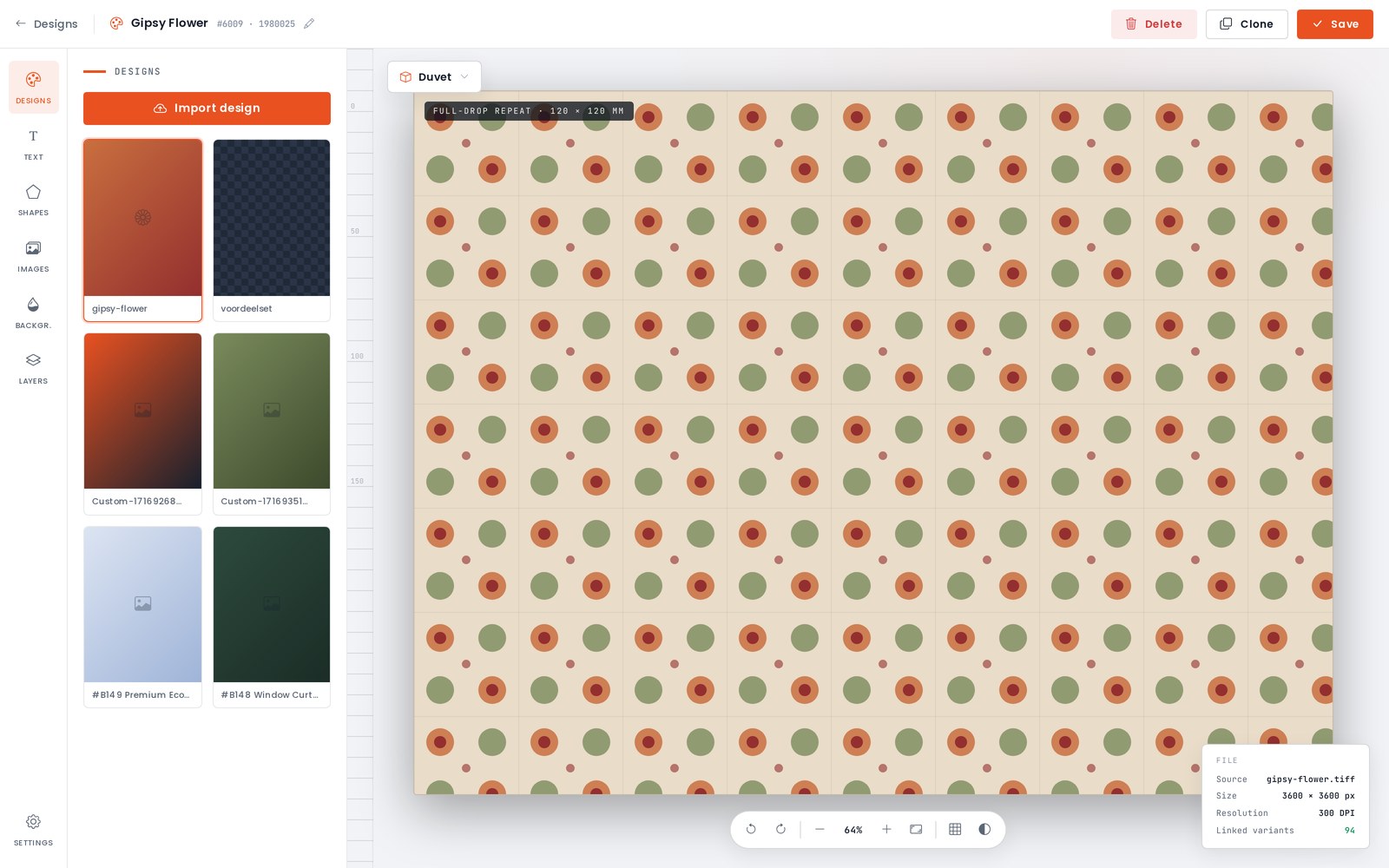
Fabrixa Studio is a full design canvas in your browser. Upload your artwork, add text, shapes and backgrounds, work in layers, and set repeats and tiles across the whole product. Switch between product templates — duvet, pillow, towel and more — all at real print dimensions. No design software, no setup files.
And there is no minimum. Design one product and order exactly one — a sample, a prototype, a single piece for a customer. MOQ 1 is not a promotion; it is how the platform works.
Drop the Fabrixa Studio design widget straight onto your store — your logo, your colours, your brand. Your customers personalise the product; you and Fabrixa handle the rest.

Start from a Fabrixa base product, choose the fabric base, the quality and the sizes, and the platform builds every variant for you. Set your own SKU and your own selling price — your margin is yours to decide.
When it’s ready, push it straight to your connected shop. Three steps and the product is live and sellable.
Overview → Customise → Set prices


Pick the product, tick the sizes you want to sell and put your design on them — make it once and the platform offers to apply it to the other sizes. Then set your retail price: you see the base price, what you keep per piece and what that is as a percentage — across the board or per variant.
Name it, describe it, pick the listing images from your own designs, and publish. It lands in your connected shop with your slug, your categories and your SKUs — and you can change any of it afterwards.
Variants & designs → Price & details → Publish


Not every order comes in through a shop. Pick the customer or add a new one, add the items — a whole size run in one go, with the right design already on each variant — and every line prices itself as you go.
The platform keeps you honest: an item without a print-ready design cannot be ordered, and it says so before you reach the checkout. After that it splits the order into shipments by production country, applies the right VAT and takes it from your balance.
Customer → Items → Ship & pay


The same flow, addressed to you. One piece per size, from the same catalogue, the same cloth and the same production line as a customer order — because MOQ 1 applies to you too.
Before you confirm you see exactly where the money goes: the pieces, a shipment per production country with its own carrier and rate, the VAT that applies, and what comes off your balance. Place it and it is tracked per shipment, like any other order.
Samples → Confirm


Every order sits in one list with live production and fulfilment status. Print files generate automatically the moment an order is accepted — no prepress, no back-and-forth.
Production, packing and shipping all happen for you — every order is tracked end to end and the updates land back in your dashboard automatically. When something needs your attention, it tells you. When it doesn’t, it just runs.


A timeline from accepted to delivered, the boxes with the country they are made in and the carrier that takes them, and every item with the design file that went to print.
Beside it the money: what the order cost you, what shipping and VAT came to, what your customer paid and what you kept. Below it every event with a timestamp — paid, accepted, batch started — so you never have to ask where an order stands.


Everything around the orders, in the same place as the orders.
Sales by order, item and channel. Product and variant performance. Export it all to CSV or Excel whenever you need it.
Pay for each order when you place it, or run on a prepaid balance: top up your account, and production, printing and shipping draw down as orders flow. Every transaction, invoice and payout is visible — no subscription, no lock-in.
See pricing →Invite your team with the access that fits — owner, admin, designer, finance, or roles you define yourself. Sign in with Google, Microsoft or Apple.
Salīdziniet ražotājvalsti un muitas noteikumus, drukāšanas metodi, minimālo pasūtījuma apjomu, „white-label“ piegādi, sertifikātus un to, vai varat uzzināt cenu pirms reģistrācijas.
Skatīt salīdzinājumu →It is when your retail price exceeds the landed cost per piece; the guide works one T-shirt from retail price to margin with live prices.
Lasiet rokasgrāmatu →Low start-up risk and MOQ 1, against a per-piece price that a large screen-printed run of one design can undercut, and a dispatch window of 2 to 10 business days.
Lasiet rokasgrāmatu →Choose Fabrixa because the platform is the product: connect once, and your orders, designs, production and shipping all run through a single dashboard. Link Shopify or WooCommerce, design in Fabrixa Studio, or power your own POD platform through the API, and Fabrixa prints, packs and ships every order white-label from the EU. From 1 piece to 100,000, there are no minimums, no setup fees and no contracts.
Reactive print is the engine, and the platform is how you drive it. Orders are reactive-printed in the EU, packed in your box and shipped to your customer. Print files generate automatically once an order is accepted, and an item without a print-ready design cannot be ordered. You can order one piece per size for yourself, made on the same cloth and production line as a customer order.
Every order, from every channel, lands in the same list with live production and fulfilment status. Design in Fabrixa Studio, set your own SKU and selling price, or create an order by hand from the dashboard. Invite your team as owner, admin, designer or finance. You pay per unit at the tier price shown in the dashboard, drawn from a prepaid balance with no subscription. Skatiet cenas.
„Fabrixa Studio“ ir pārlūkprogrammā bāzēta dizaina darba virsma, kas paredzēta drukājamo izstrādājumu izveidei platformā „Fabrixa“. Klienti augšupielādē grafiku, pievieno tekstu, figūras un fonus, strādā ar slāņiem, kā arī iestata atkārtojumus un mozaīkas izstrādājumu veidņos, piemēram, segās, spilvenos un dvieļos, — un to visu reālos drukas izmēros. Nav nepieciešama nekāda dizaina programmatūra vai atsevišķi iestatījumu faili.
Jā, Fabrixa Studio dizaina logrīku var ievietot tieši klienta veikalā, izmantojot šī veikala logotipu un krāsas Fabrixa zīmola vietā. Galapatērētāji paši personalizē produktu, izmantojot ievietoto logrīku, savukārt Fabrixa aizkulisēs nodrošina ražošanu un pasūtījumu izpildi. Vidžets darbojas kopā ar standarta Shopify un WooCommerce integrācijām.
Jūs samaksājat par katru pasūtījumu tā veikšanas brīdī vai izmantojat priekšapmaksas atlikumu: papildiniet kontu, un ražošanas, drukāšanas un sūtīšanas izmaksas tiek automātiski atskaitītas no šī atlikuma, tiklīdz tiek saņemti pasūtījumi. Katrs darījums, rēķins un izmaksa vienmēr ir redzama vadības panelī. Pārskati arī sadala pārdošanas apjomus pa pasūtījumiem, precēm un kanāliem, un tos var eksportēt CSV vai Excel formātā.
Fabrixa ļauj konta īpašniekam uzaicināt komandas locekļus ar dažādiem piekļuves līmeņiem: īpašnieks, administrators, dizainers un finanšu speciālists, vai arī pēc konta īpašnieka ieskatiem definētas pielāgotas lomas. Komandas locekļi piesakās, izmantojot Google, Microsoft vai Apple kontu, nevis atsevišķu Fabrixa paroli. Šī piekļuve ir integrēta tajā pašā vadības panelī, ko izmanto pasūtījumiem, dizainiem un rēķiniem.
Jā, klients pats nosaka pārdošanas cenu un SKU katram produktam, kas izveidots uz Fabrixa platformas, un peļņas marža ir pilnībā viņa ziņā. Fabrixa nodrošina pamatproduktu, auduma izvēles iespējas, izmērus un variantus, katru variantu izveidojot automātiski pēc izvēles veikšanas. Pēc tam gatavo produktu trīs soļos var tieši nosūtīt uz savienoto pārdošanas kanālu.
Jā, Shopify ir integrēta sistēma: pietiek vienreiz savienot veikalu, un katrs pasūtījums tiek importēts automātiski, turklāt ražošanas statuss un sūtījuma izsekošanas informācija tiek atspoguļota pasūtījumā. Jūs izstrādājat produktus Fabrixa Studio, izmantojot reālus produktu veidnes, publicējat tos ar savu SKU un cenu, un Fabrixa no ES izdrukā, iesaiņo un nosūta katru pasūtījumu ar „white-label” marķējumu. WooCommerce darbojas tāpat, un REST API atbalsta pielāgotas platformas.
Reģistrējieties platformā, savienojiet savu Shopify veikalu no vadības paneļa, un pasūtījumi sāks importēties automātiski, bez eksportēšanas vai kopēšanas un ielīmēšanas. Pēc tam atveriet Fabrixa Studio, ievietojiet savu grafisko dizainu uz produkta veidnes un publicējiet produktu savā kanālā ar savu Fabrixa kodu un cenu. No šī brīža katrs pasūtījums, kas nonāk jūsu veikalā, tiek nosūtīts tieši ražošanā un piegādāts klientam ar „white-label” marķējumu, kamēr jūs varat sekot līdzi pasūtījuma statusam vadības panelī.
Jā, Shopify ir viens no četriem kanāliem. WooCommerce piedāvā tādu pašu integrāciju, pielāgotās platformas savienojas ar REST API, izmantojot webhookus, un jūs varat manuāli izveidot jebkuru pasūtījumu no vadības paneļa — piemēram, vienreizēju pasūtījumu vai vairumtirdzniecības pasūtījumu. Katrs pasūtījums no jebkura kanāla nonāk vienā sarakstā, kurā tiek parādīts reāllaika ražošanas un izpildes statuss.
The platform itself costs nothing: no platform fee, no subscription, no integration fee and no annual minimum. You pay per unit at the tier price shown in the dashboard, plus shipping itemised at checkout, and the per-unit price steps down automatically as your monthly volume grows.
T-krekls ar uzdruku pašlaik maksā no 19,95 eiro par vienību.
Jūs samaksājat par katru pasūtījumu, to veicot platformā, vai arī papildināt priekšapmaksas elektronisko maku; neizmantotais atlikums elektroniskajā makā tiek atmaksāts.

Create your account and place your first order today — one piece, no minimum. Or talk to our team about onboarding a larger operation.
Mūsu minimālais pasūtījuma daudzums ir 1 vienība visiem produktiem.
Lasīt atbildi →Mēs nevaram sniegt konsultācijas par jūsu PVN reģistrāciju vai ES vienoto kontaktpunktu (OSS); šiem pakalpojumiem ir saistītas reālas izmaksas, tāpēc lūdzu noskaidrojiet savas saistības kopā ar savu grāmatvedi.
Lasīt atbildi →Ja esat veikuši pirkumu interneta veikalā un jums ir jautājums par pasūtījumu, lūdzu, sazinieties ar veikalu, kurā veicāt pasūtījumu — tieši viņi apstrādā jūsu pasūtījumu un nodrošina klientu apkalpošanu.
Lasīt atbildi →Visas 22 atbildes par pasūtīšanu, cenu noteikšanu un rēķinu izrakstīšanu → Jautājiet mūsu atbalsta komandai →
