





















01
Poveži se
Connect your shop
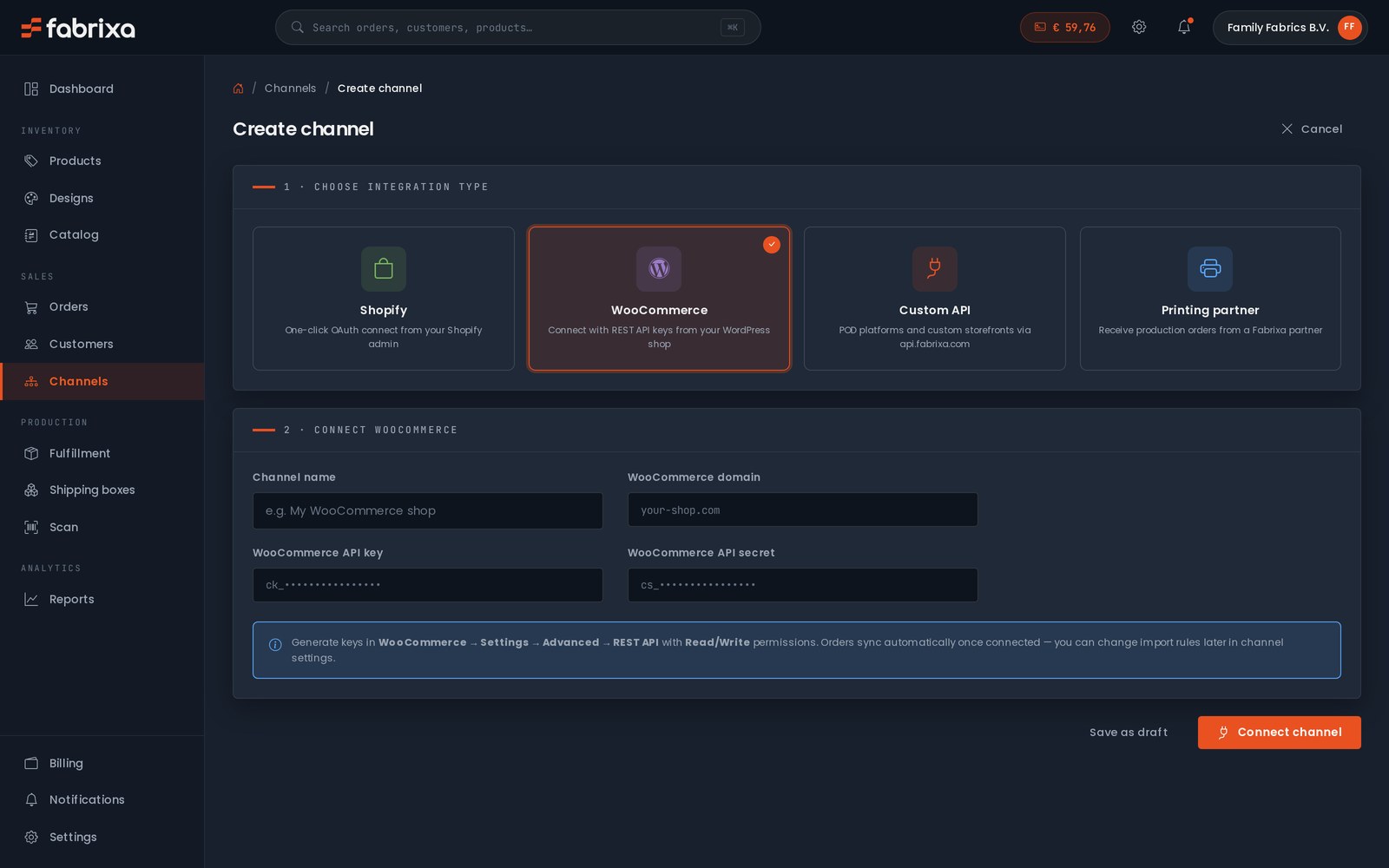
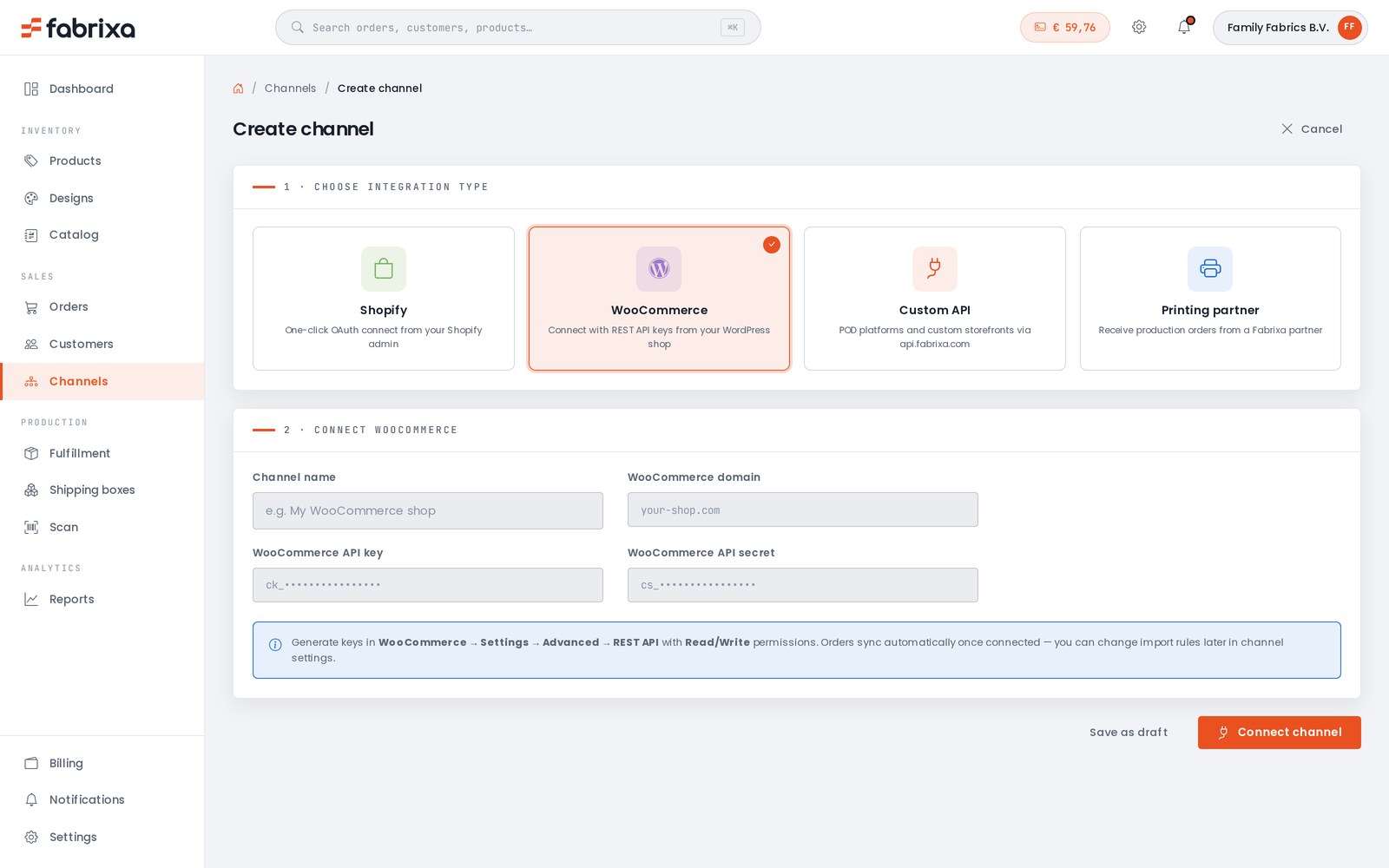
Link your Shopify or WooCommerce store, or build straight onto the API. Orders import on their own.

Connect the shop you already run, design your products in Fabrixa Studio, or power your own POD platform through our API — and we print, pack and ship every order. From 1 piece to 100,000 — no minimums, no setup fees, no contracts.
A print partner usually means a PDF price list and an email address. Every order is a message, every change is a thread, every status update is a question you have to ask.
Fabrixa works differently. The platform is the product: connect once, and your orders, designs, production and shipping all run through a single dashboard. Reactive print is the engine — the platform is how you drive it.


Set it up once. After that, every order that lands in your shop flows through to production without you lifting a finger.
Link your Shopify or WooCommerce store, or build straight onto the API. Orders import on their own.
Open Fabrixa Studio, drop your artwork onto a real product template, and set it to print.
Publish to your channels with your own SKU and price. Sell one or ten thousand — the platform doesn’t mind.
Reactive-printed in the EU, packed in your box, shipped to your customer. You watch it happen.
Run a Shopify store? A WooCommerce site? Building your own? Connect it once and orders import automatically — no copy-paste, no exports, no missed orders.
Need to place something by hand — a sample, a one-off, a wholesale order? Create it straight from the dashboard. Every order, from every channel, lands in the same list.
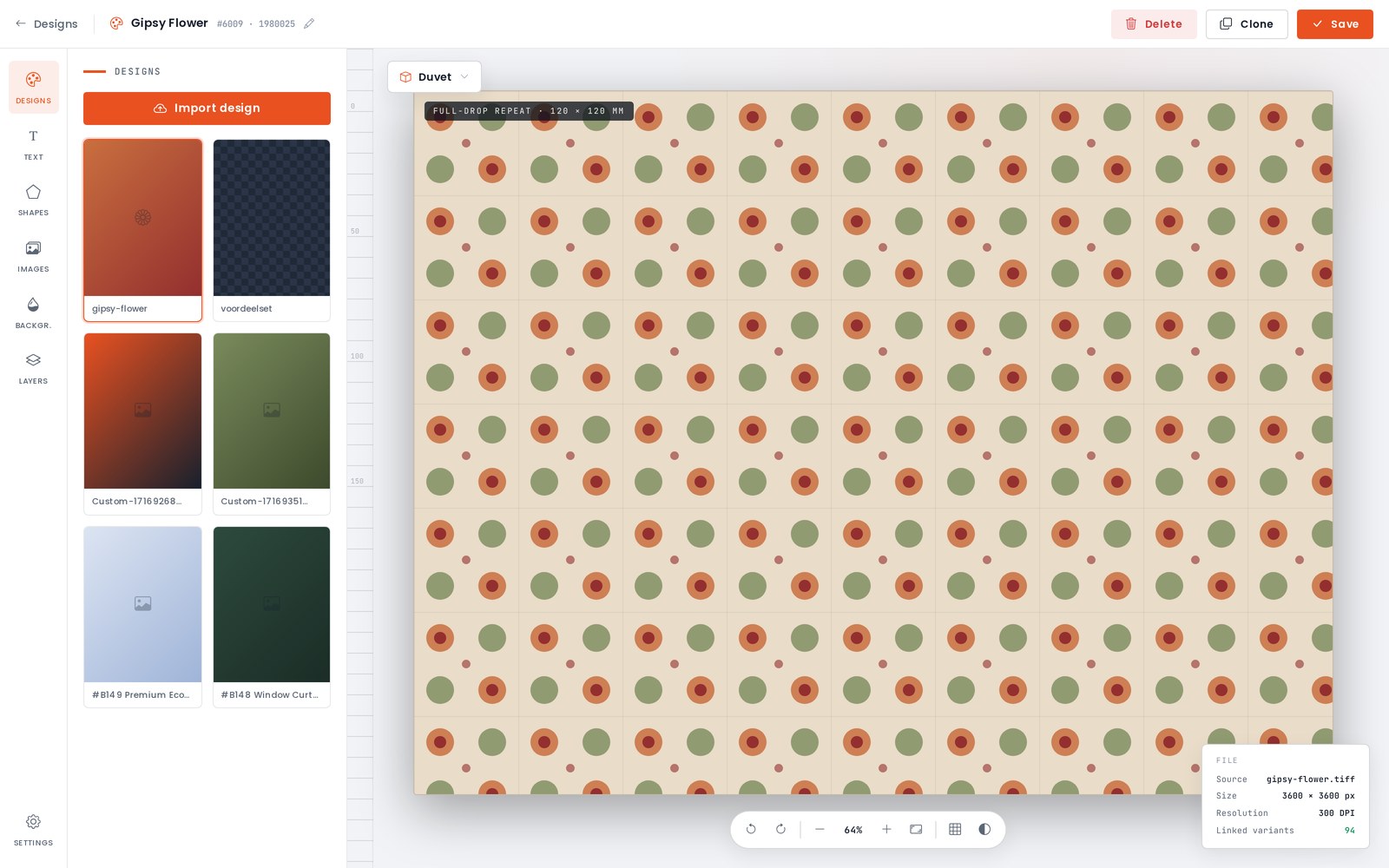
Fabrixa Studio is a full design canvas in your browser. Upload your artwork, add text, shapes and backgrounds, work in layers, and set repeats and tiles across the whole product. Switch between product templates — duvet, pillow, towel and more — all at real print dimensions. No design software, no setup files.
And there is no minimum. Design one product and order exactly one — a sample, a prototype, a single piece for a customer. MOQ 1 is not a promotion; it is how the platform works.
Drop the Fabrixa Studio design widget straight onto your store — your logo, your colours, your brand. Your customers personalise the product; you and Fabrixa handle the rest.

Start from a Fabrixa base product, choose the fabric base, the quality and the sizes, and the platform builds every variant for you. Set your own SKU and your own selling price — your margin is yours to decide.
When it’s ready, push it straight to your connected shop. Three steps and the product is live and sellable.
Overview → Customise → Set prices


Pick the product, tick the sizes you want to sell and put your design on them — make it once and the platform offers to apply it to the other sizes. Then set your retail price: you see the base price, what you keep per piece and what that is as a percentage — across the board or per variant.
Name it, describe it, pick the listing images from your own designs, and publish. It lands in your connected shop with your slug, your categories and your SKUs — and you can change any of it afterwards.
Variants & designs → Price & details → Publish


Not every order comes in through a shop. Pick the customer or add a new one, add the items — a whole size run in one go, with the right design already on each variant — and every line prices itself as you go.
The platform keeps you honest: an item without a print-ready design cannot be ordered, and it says so before you reach the checkout. After that it splits the order into shipments by production country, applies the right VAT and takes it from your balance.
Customer → Items → Ship & pay


The same flow, addressed to you. One piece per size, from the same catalogue, the same cloth and the same production line as a customer order — because MOQ 1 applies to you too.
Before you confirm you see exactly where the money goes: the pieces, a shipment per production country with its own carrier and rate, the VAT that applies, and what comes off your balance. Place it and it is tracked per shipment, like any other order.
Samples → Confirm


Every order sits in one list with live production and fulfilment status. Print files generate automatically the moment an order is accepted — no prepress, no back-and-forth.
Production, packing and shipping all happen for you — every order is tracked end to end and the updates land back in your dashboard automatically. When something needs your attention, it tells you. When it doesn’t, it just runs.


A timeline from accepted to delivered, the boxes with the country they are made in and the carrier that takes them, and every item with the design file that went to print.
Beside it the money: what the order cost you, what shipping and VAT came to, what your customer paid and what you kept. Below it every event with a timestamp — paid, accepted, batch started — so you never have to ask where an order stands.


Everything around the orders, in the same place as the orders.
Sales by order, item and channel. Product and variant performance. Export it all to CSV or Excel whenever you need it.
Pay for each order when you place it, or run on a prepaid balance: top up your account, and production, printing and shipping draw down as orders flow. Every transaction, invoice and payout is visible — no subscription, no lock-in.
See pricing →Invite your team with the access that fits — owner, admin, designer, finance, or roles you define yourself. Sign in with Google, Microsoft or Apple.
Usporedite zemlju proizvodnje i carinske procedure, metodu tiska, minimalnu narudžbu, slanje s bijelom etiketom, certifikate i mogućnost pregleda cijene prije registracije.
Pogledajte usporedbu →To je kada vaša maloprodajna cijena premaši nabavnu cijenu po komadu; vodič radi s jednom majicom od maloprodajne cijene do marže uz aktualne cijene.
Pročitajte vodič →Nisk rizik pokretanja i MOQ 1, uz cijenu po komadu koju velika serija sitotiska jednog dizajna može nadmašiti, te rok isporuke od 2 do 10 radnih dana.
Pročitajte vodič →Choose Fabrixa because the platform is the product: connect once, and your orders, designs, production and shipping all run through a single dashboard. Link Shopify or WooCommerce, design in Fabrixa Studio, or power your own POD platform through the API, and Fabrixa prints, packs and ships every order white-label from the EU. From 1 piece to 100,000, there are no minimums, no setup fees and no contracts.
Reactive print is the engine, and the platform is how you drive it. Orders are reactive-printed in the EU, packed in your box and shipped to your customer. Print files generate automatically once an order is accepted, and an item without a print-ready design cannot be ordered. You can order one piece per size for yourself, made on the same cloth and production line as a customer order.
Every order, from every channel, lands in the same list with live production and fulfilment status. Design in Fabrixa Studio, set your own SKU and selling price, or create an order by hand from the dashboard. Invite your team as owner, admin, designer or finance. You pay per unit at the tier price shown in the dashboard, drawn from a prepaid balance with no subscription. Pogledajte cjenik.
Fabrixa Studio je preglednička radna površina za dizajniranje proizvoda za tisak na platformi Fabrixa. Korisnici učitavaju grafike, dodaju tekst, oblike i pozadine, rade u slojevima te postavljaju ponavljanja i pločice na predlošcima proizvoda poput prekrivača, jastuka i ručnika, sve u stvarnim dimenzijama tiska. Nije potreban nikakav dizajnerski softver niti zasebne datoteke za postavljanje.
Da, Fabrixa Studio dizajnerski widget može se ugrađivati izravno na trgovinu kupca, koristeći logo i boje te trgovine umjesto brendiranja Fabrixa-a. Krajnji kupci sami personaliziraju proizvod putem ugrađenog widgeta, dok Fabrixa iza kulisa brine o proizvodnji i isporuci. Widget radi uz standardne Shopify i WooCommerce integracije.
Plaćate svaku narudžbu prilikom njezinog davanja ili poslujete s unaprijed plaćenim saldom: dopunite račun, a troškovi proizvodnje, tiska i dostave automatski se oduzimaju s tog salda kako narudžbe pristižu. Svaka transakcija, račun i isplata uvijek su vidljivi na nadzornoj ploči. Izvještaji također razlažu prodaju po narudžbi, artiklu i kanalu te se mogu izvesti u CSV ili Excel.
Fabrixa omogućuje vlasniku računa da pozove članove tima s različitim razinama pristupa: vlasnik, administrator, dizajner i financije, ili prilagođene uloge koje račun sam definira. Članovi tima prijavljuju se putem Googlea, Microsofta ili Applea umjesto zasebne Fabrixa lozinke. Ovaj pristup postoji paralelno s istom nadzorном pločom koja se koristi za narudžbe, dizajne i naplatu.
Da, kupac postavlja vlastitu prodajnu cijenu i SKU za svaki proizvod izrađen na Fabrixa platformi, pri čemu je marža u potpunosti na njemu. Fabrixa osigurava osnovni proizvod, opcije tkanina, veličine i varijante te automatski izrađuje svaku varijantu nakon odabira. Gotov proizvod potom se može izravno poslati na povezani prodajni kanal u tri koraka.
Da, Shopify je nativna integracija: povežite trgovinu jednom i svaka se narudžba automatski uvozi, a status proizvodnje i praćenje vraćaju se natrag narudžbi. Dizajnirate proizvode u Fabrixa Studiju na stvarnim predlošcima proizvoda, objavljujete ih sa svojim SKU i cijenom, a Fabrixa štampa, pakira i šalje svaku narudžbu white-label iz EU. WooCommerce radi na isti način, a REST API pokriva prilagođene platforme.
Registrirajte se na platformi, povežite svoju Shopify trgovinu s nadzorne ploče i narudžbe se počinju automatski uvoziti, bez izvoza ili kopiranja i lijepljenja. Zatim otvorite Fabrixa Studio, postavite svoj dizajn na predložak proizvoda i objavite proizvod na svom kanalu sa svojim SKU i cijenom. Od tog trenutka svaka narudžba koja stigne u vašu trgovinu ide izravno u proizvodnju i šalje se kupcu s vašim brendom, dok vi pratite status u nadzornoj ploči.
Da, Shopify je jedan od četiri kanala. WooCommerce ima istu ugrađenu integraciju, prilagođene platforme povezuju se putem REST API s webhookovima, a možete ručno kreirati bilo koju narudžbu s nadzorne ploče, za uzorak, jednokratnu ili veleprodajnu narudžbu. Svaka narudžba iz svakog kanala završava na istom popisu s trenutačnim statusom proizvodnje i ispunjenja.
The platform itself costs nothing: no platform fee, no subscription, no integration fee and no annual minimum. You pay per unit at the tier price shown in the dashboard, plus shipping itemised at checkout, and the per-unit price steps down automatically as your monthly volume grows.
Cijena tiskane majice trenutno počinje od 19,95 € po komadu.
Plaćate svaku narudžbu prilikom njezina postavljanja na platformi ili dopunjujete prepaid novčanik; neiskorišteni iznos na novčaniku može se vratiti.

Create your account and place your first order today — one piece, no minimum. Or talk to our team about onboarding a larger operation.
Naša minimalna narudžba je 1 za sve.
Pročitaj odgovor →Ne možemo davati savjete o vašoj vlastitoj registraciji za PDV ili o EU sustavu One-Stop Shop (OSS); to ima stvarne troškove, stoga provjerite svoje obveze sa svojim računovođom.
Pročitaj odgovor →Ako ste kupili u internetskoj trgovini i imate pitanje o svojoj narudžbi, obratite se trgovini od koje ste naručili — oni izravno rješavaju vašu narudžbu i korisničku podršku.
Pročitaj odgovor →Sva 22 odgovora o naručivanju, cijenama i naplatama → Obratite se našem timu za podršku →
